What it does, line by line
Every line on this page works in TidyBookings today. Near the end is a short list of what it doesn't do yet, so you can decide before you sign up.
The booking page your clients see
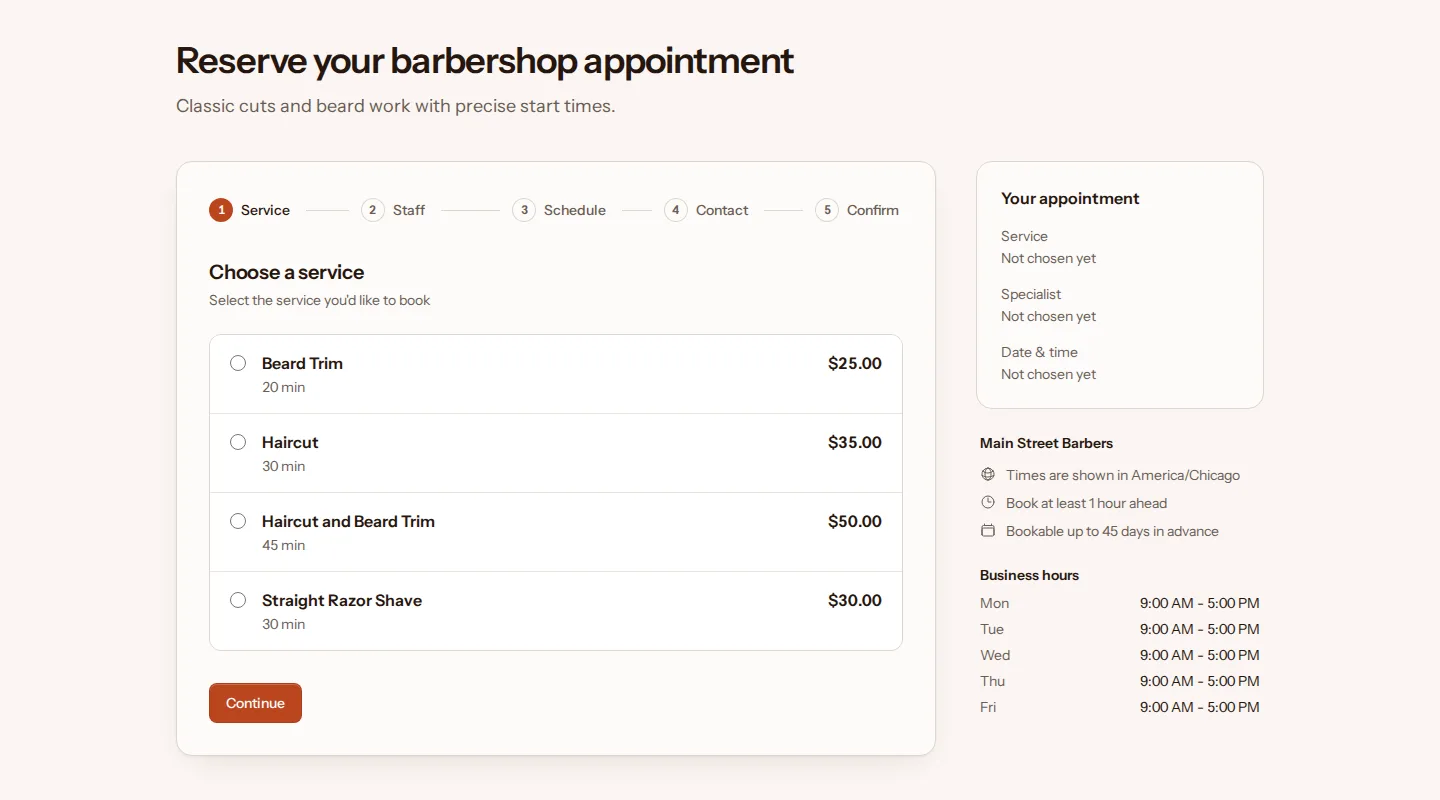
Each business gets its own booking page. Clients choose a service, then the person they want to see or whoever is free first, then a date and an open time. They check the details on a review screen and confirm.
- Your look
- Title, description, logo, background image and brand color.
- Link previews
- Your own SEO title and description for when the link is shared.
- Staff choice
- A named person, or whoever is free first.
- Guest booking
- Name and email address, with the phone number optional.
- Timezone
- Times shown in your business's own timezone.
- Draft mode
- Keep the page hidden until it's ready.
Clients change their own bookings
Every confirmation and reminder email carries a private manage link. It opens a page for that one booking, and the client doesn't need an account or a password to use it.
- Move it
- The client picks another open time with the same person, for the same service. You, your staff and the client each get an email about the new time.
- Cancel it
- One button, with room for a reason if they want to give one. The time opens up on your booking page again, and anyone waiting for that day hears about it.
- Up to your cutoff
- You set how close to the appointment clients can still move it, and separately how close they can still cancel. After that, the online options close and clients contact you directly.
Emails that go out on their own
Each one goes out by itself when a booking is made, moved, canceled or coming up.
- Confirmation
- To the client, with the details, add-to-calendar links for Google, Outlook and Yahoo, and the manage link.
- New booking
- To you and your staff.
- Reminder
- A day before the appointment, or a day before online changes close if your cutoff is a day or longer. To the client with the manage link, and to you and your staff.
- Rescheduled
- To the client with the new time and fresh calendar links, and to you and your staff.
- Canceled
- To the client, and to you and your staff.
- Spot opened
- To everyone on the waitlist for that day, when a booking on it is canceled or moved.
Services and booking rules
The preset for your trade fills in a starting list of services and a set of rules. Rename, re-price or switch off anything that doesn't fit, and add services of your own. See the starting setup for each trade.
Each service has
- Duration
- How long the appointment takes.
- Buffer
- Time kept free between appointments, for cleaning up or getting ready.
- Price
- In your currency. Leave it blank if you quote in person.
- Capacity
- How many clients one appointment can take, for classes and group sessions.
- Description
- A line or two shown under the service on your booking page.
Your booking rules
- Notice
- How soon before an appointment clients can still book it.
- Booking window
- How many days ahead clients can book.
- Cancel cutoff
- How close to the appointment clients can still cancel online.
- Move cutoff
- How close to the appointment clients can still reschedule online.
The barbershop preset, for example, starts with 1 hour of notice, bookings up to 45 days ahead, and online canceling until 12 hours before the appointment.
Staff and their hours
Give each person who takes appointments their own login. Clients can only book a time when someone is working and free, so each person's weekly hours decide what your booking page offers.
- Logins You create one for each staff member
- Weekly hours Each person's own, set by them or by you
- Time off Block a date and time, with an optional reason
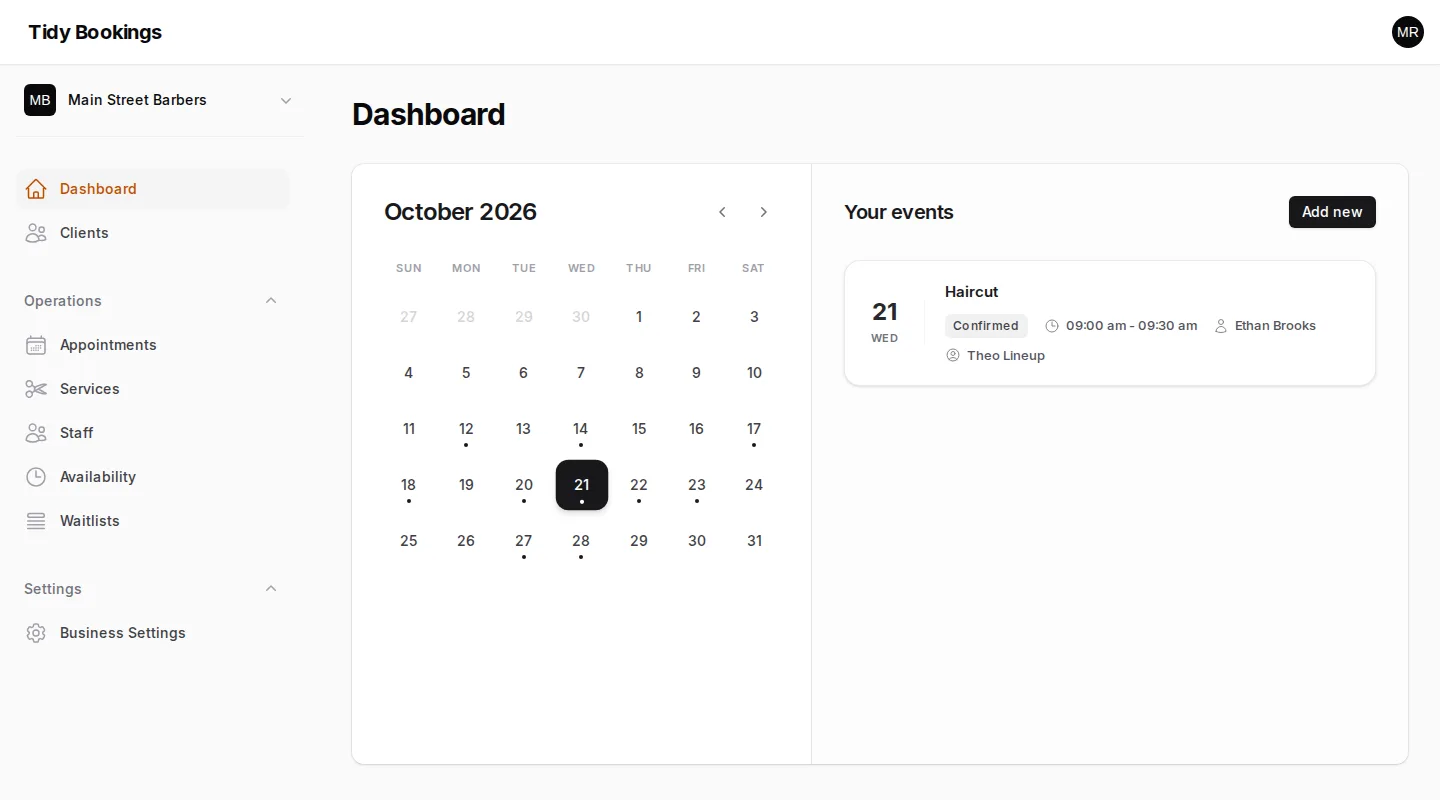
- Calendar The month's appointments, and each day's list
- Booking emails You and your staff hear about every change
A waitlist and a client list
Full days take names
When the day a client wants has no open times, they can join the waitlist for it, with a time preference if they have one. If a booking on that day is canceled or moved, everyone on that day's list gets an email saying a spot has opened. Every entry shows up in your dashboard.
Everyone who books
Each client who books is added to your client list with their name, email and phone number, how many bookings they've made and the date of their latest one. Add your own notes to any record, or add clients yourself.
Several businesses, one login
Run more than one business from the same account. Each has its own booking page, services, staff, rules and timezone, and its data is kept separate from every other business.
Turn on two-factor login and TidyBookings asks for a code from your authenticator app as well as your password, with recovery codes in case you lose your phone.
Not available yet
If your business depends on one of these today, TidyBookings isn't the right fit yet.
- Online payments and deposits
- Text message reminders
- Two-way calendar sync
- Integrations or an API
- Recurring appointments
- Intake forms
- Reports and analytics
- Languages other than English
Clients pay you the way they do today. Reminders go out by email, and confirmation emails carry add-to-calendar links for Google, Outlook and Yahoo.
See it from your client's side
Every trade has a demo business with a working booking page. Demo data is reset every day.
Free, with common-sense limits. No card needed.